Adding Listings
Last updated: June 18, 2026
Listings can be added to your site manually at any time, or imported from the MLS if you have an active MLS ID connected.
Avenue gives you two ways to add listings that aren't directly tied to your own MLS activity — whether that's a buyer's sale, a reciprocity listing, or a property you're co-representing. You can import by MLS ID or upload a CSV file (ideal for batches).
This article walks through both methods so you can choose whichever fits your situation.
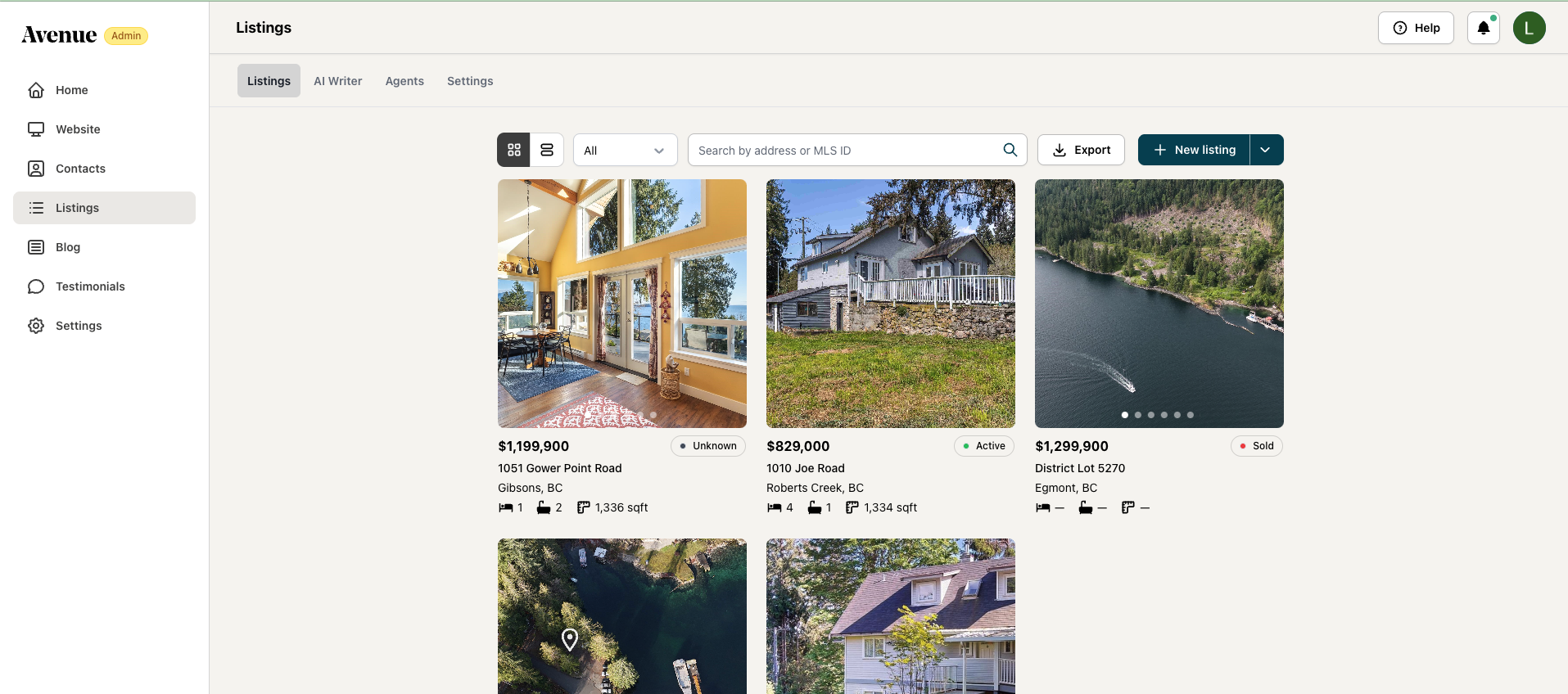
Go to your Listings page
From your Avenue dashboard, select Listings in the left sidebar. This is where all your active, sold, and imported listings live.
Open the "New listing" menu
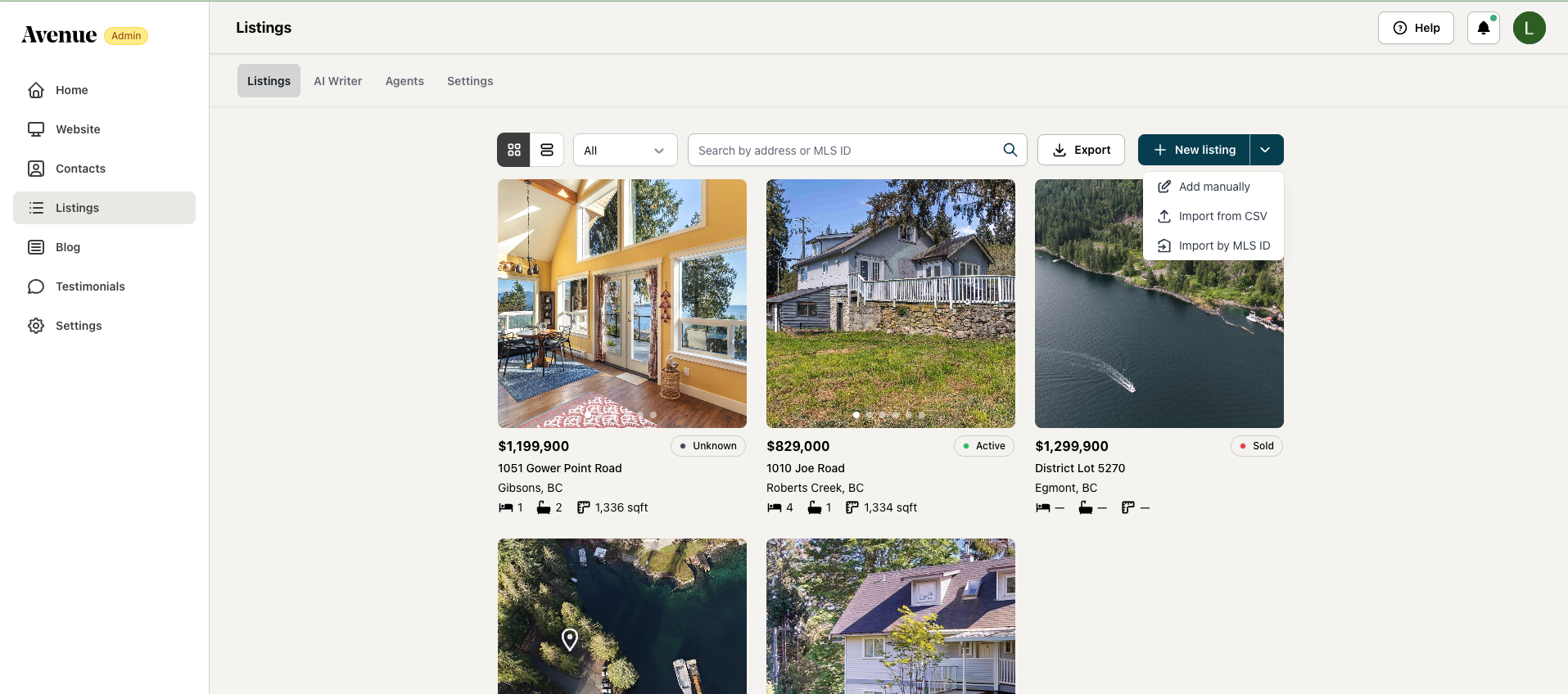
In the top-right corner of the Listings page, click the dropdown arrow next to + New listing. A small menu will appear with three options: Add manually, Import from CSV, and Import by MLS ID.
Which method should I use?
Option A: Import by MLS ID — Best for smaller amounts of listings.
Option B: Import from CSV — Best for bulk imports.
Use add manually for listings from other boards and off-market listings.
Option A — Import by MLS ID
Import by MLS ID
This is the quickest path for any listing you can find on your agent's board. Avenue searches for the MLS ID and pulls all available listing data automatically — photos, details, and status included.
Step 1: Select "Import by MLS ID" from the dropdown
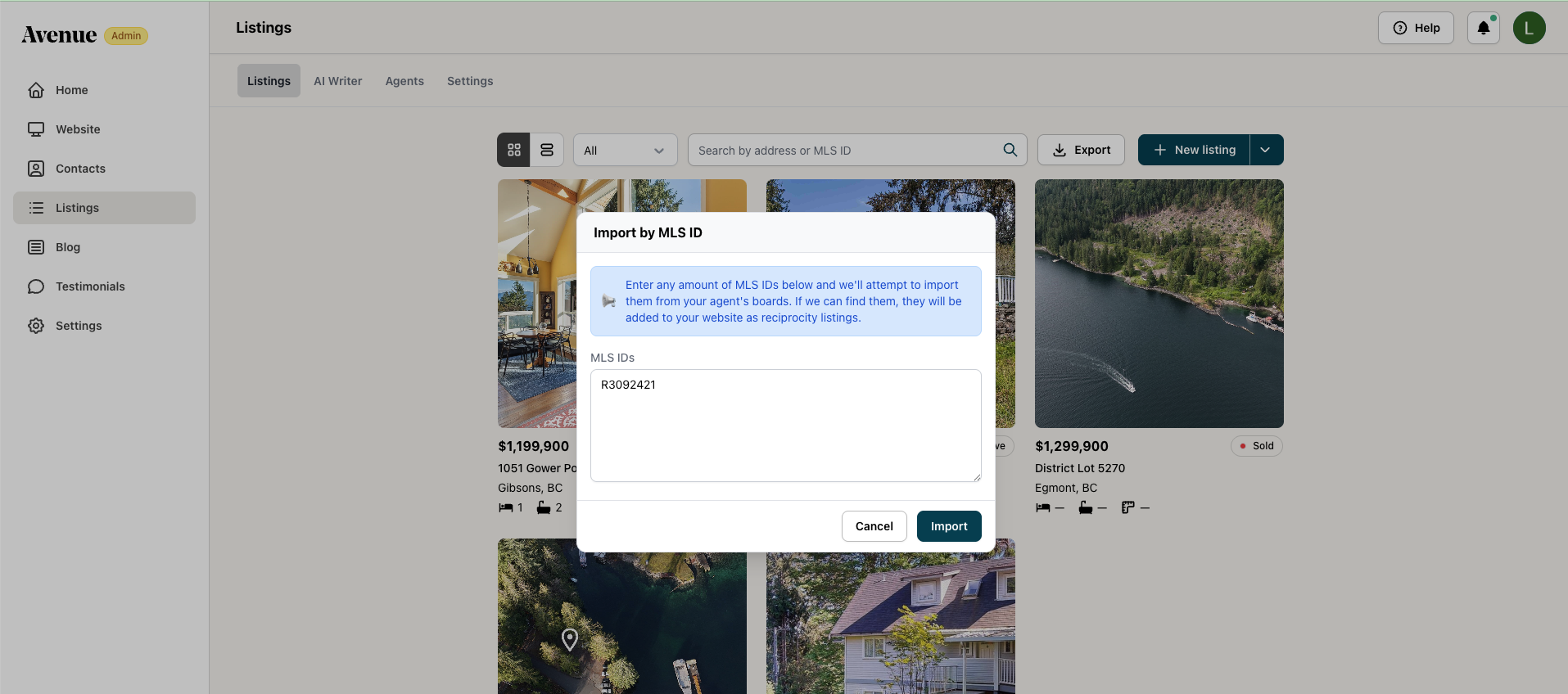
A dialog box will open with a text area labelled MLS IDs.
Step 2: Enter one or more MLS IDs
Type or paste each MLS ID into the field. You can enter multiple IDs at once — add each one on a new line.
Step 3: Click "Import"
Avenue will search your agent's boards and attempt to match each ID. Any listings it finds will be added to your site as reciprocity listings.
Heads up: If Avenue can't locate a listing on your agent's boards, it won't be imported.
Option B — Import from CSV
Import from CSV
Need to add a batch of listings, or working with properties that aren't on your board? The CSV import lets you build a spreadsheet with your listing data and upload it directly to Avenue.
Step 1: Select "Import from CSV" from the dropdown
An upload dialog will open, prompting you to drag and drop a CSV file or click to select one from your computer.
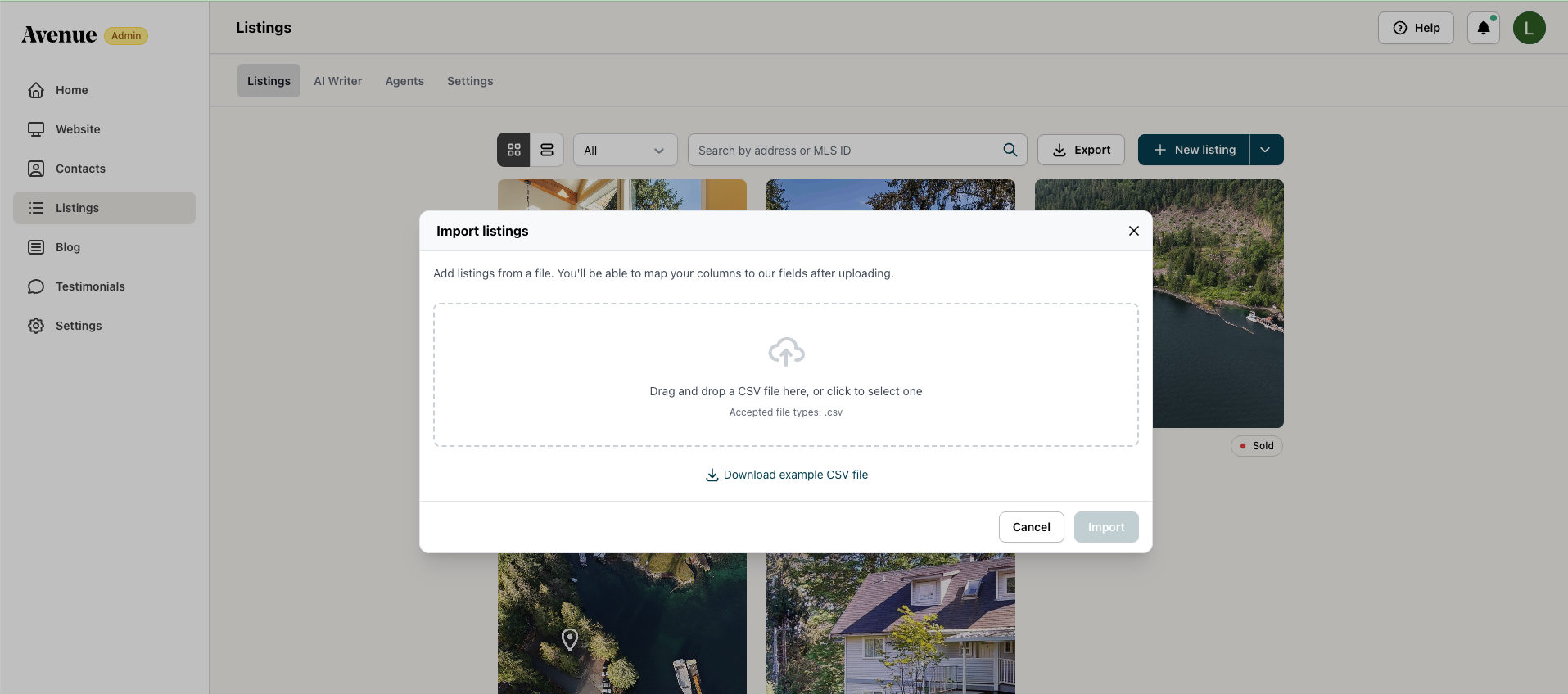
Drag your CSV file into the upload area, or click to browse your files.
Step 2: Prepare your CSV file
Not sure how to format it? Click Download example CSV file in the dialog for a ready-made template.
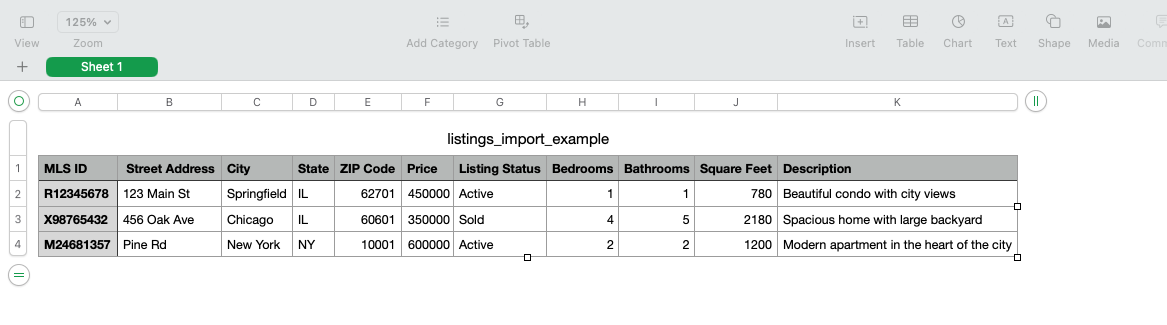
The example CSV shows the expected structure, so make sure to use it as your starting point. The CSV uses the following columns:
Column | Description | Example |
|---|---|---|
| Unique listing identifier | R12345678 |
| Full street address | 123 Main St |
| City name | Springfield |
| Province or state abbreviation | IL |
| Postal or ZIP code | 62701 |
| Listing price (numbers only, no symbols) | 450000 |
| Current status of the property | Active, Sold |
| Number of bedrooms | 3 |
| Number of bathrooms | 2 |
| Total interior square footage | 1200 |
| Short property description (optional) | Modern apartment in the heart of the city |
Tip: Keep your CSV clean before uploading: remove any formatting (dollar signs, commas in numbers, merged cells) and make sure each row represents exactly one listing. This avoids most common import errors.
Step 3: Upload your file and map your columns
Once you select your CSV, Avenue will let you map each column to the correct field before completing the import. This is your chance to catch any mismatches before the listings go live.
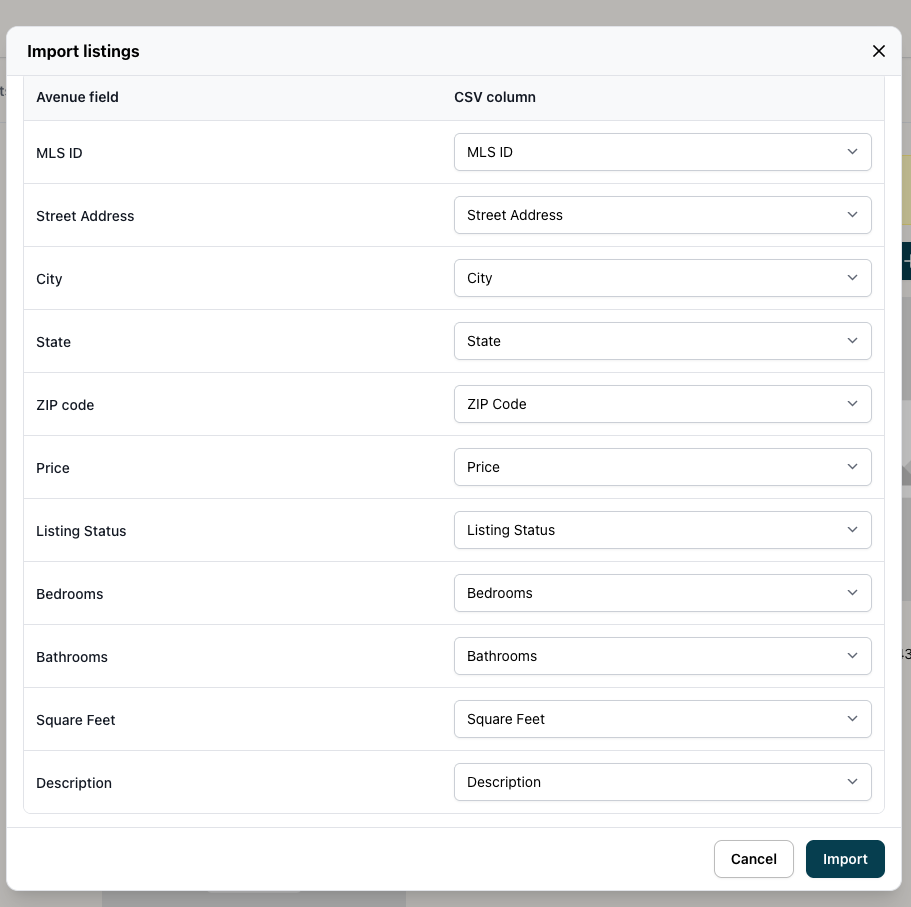
Step 4: Click "Import" to finish
Avenue will process your file and add each valid listing to your site. Listings will appear in your Listings page once the import is complete.
What happens after import?
Once added, your listings will appear in the Listings Manager, where you can:
Filter and update listing statuses: Active, Pending, Sold, Cancelled, Expired, or Unknown
Search listings by MLS number
Add custom tags to control where listings appear across your site